ACH bank transfers
US bank transfers, their asynchronous lifecycle, and the three things they cannot do.
The API supports ACH (Automated Clearing House) bank transfer transactions for US-based payments. ACH transactions are processed asynchronously and may take 1-5 business days to complete.
Supported transaction types
- Sale - Initiate a bank transfer from the customer's bank account
- Refund - Process reversal of a previous ACH sale transaction
- Token Sale - Process a sale using a previously tokenized ACH payment method
Personal and business accounts
For ACH sale and tokenization sessions, the Payment SDK and Hosted Payment Form display a Personal Account / Business Account toggle above the name fields. Personal Account is selected by default. The customer selects the option that matches the bank account holder.
| Selection | Name fields |
|---|---|
| Personal Account | First Name is required (1 to 30 characters). Middle Name is optional (up to 40 characters). Last Name is required (1 to 40 characters). |
| Business Account | Business Name replaces the personal name fields and is required (2 to 70 characters). Enter the business name on the bank account. |
Name lengths exclude leading and trailing spaces. Switching between the options preserves the entered names. The form uses the name for the selected option as the billing name.
The customer also selects Checking or Savings in the Account Type field. This describes the bank account type; Personal Account / Business Account describes who holds it. Both choices require the routing number, account number, and full US billing address, including a 5-digit ZIP code.
The toggle appears automatically for ACH sessions. There is no formConfig property or SDK mount() option to preset the selection.
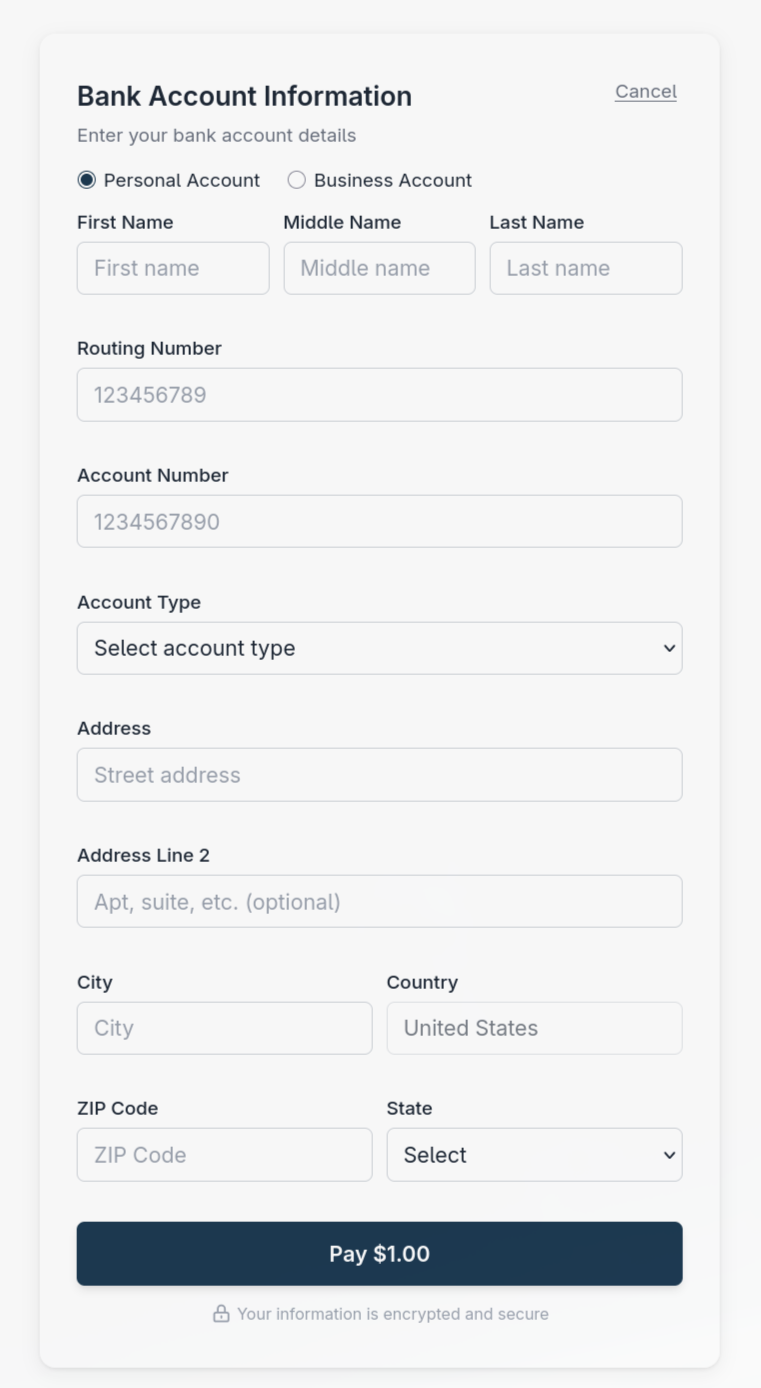
Personal Account is selected by default.
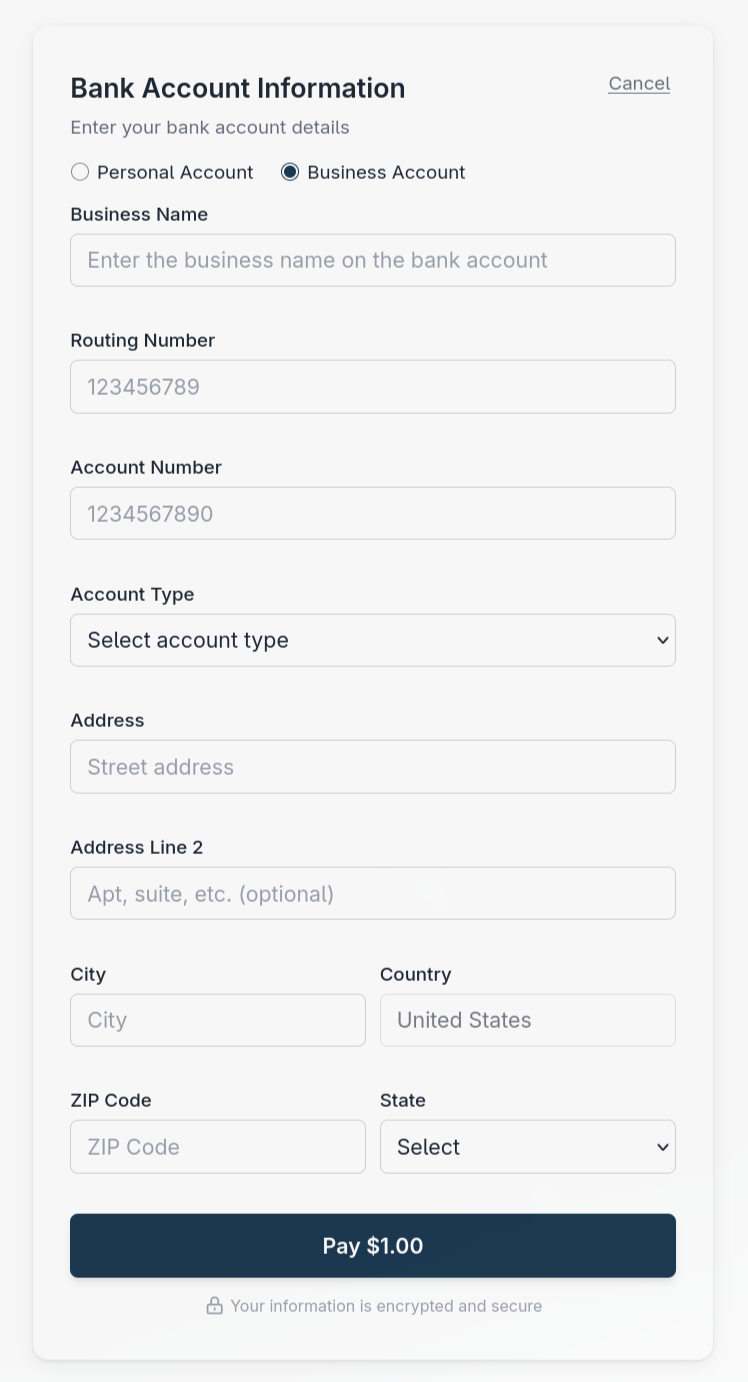
Business Account replaces the personal name fields with Business Name.
Restrictions
- Void - ACH transactions cannot be voided. Use refund instead.
- Authorization - ACH does not support authorization-only transactions. All ACH transactions are sales.
- Capture - Not applicable for ACH transactions (no separate auth/capture flow).
Attempting to use an ACH token for an auth, void, or subscription transaction is rejected with error code 2010 (InvalidPaymentMethodType).
ACH payment methods also always require full billing information: billingInfoCaptureLevel: Minimal is not supported and is rejected with a validation error. See Form configuration.
3D Secure is a card-network protocol and does not apply to ACH. Setting enable3DSecure: true on an ACH payment method is rejected with a validation error.
The asynchronous lifecycle
An ACH sale does not resolve inside the API call. This is the single biggest difference from a card transaction, and your integration has to account for it.
The session-creation response is a session object with status: Pending; it is not a debit result. After submission, the hosted ACH response uses status: Processing with resultCode: 0. Other asynchronous bank-transfer flows can return resultCode: 4001. The immediate response may report status: Completed even while settlement is pending. Neither that status nor the SDK's success: true proves that funds settled.
While a transfer is in Processing or AwaitingSettlement, transaction retrieval can return no result. An empty result is not permission to retry.
Configured webhooks carry the final transaction outcome. status: Completed means processing finished for both approval and decline. Read transactionResponses[].responseCode: 1 is approved and 10 is declined, with other codes identifying specific outcomes. There is no Declined transaction status.
Use transaction retrieval to reconcile a missed response or webhook. Bank processing time depends on the bank and the payment schedule; allow for several business days.
Do not retry an accepted transfer
An accepted transfer is still pending bank settlement. Retrying creates a second debit. Hold the order in a pending state and wait for the webhook.
Chargebacks and resubmissions
The payer's bank can act on an ACH payment after it completed. The API records each of these events as a new transaction and leaves the original sale unchanged. The new transaction's originalTransactionId links it to the sale.
Chargebacks
A chargeback is an ACH payment that the payer's bank returned after the funds reached you. It is recorded as a transaction with type: Chargeback and sends a chargeback.completed webhook.
| Field | Value on the chargeback |
|---|---|
type |
Chargeback |
originalTransactionId |
The charged-back sale. |
referenceId |
The sale's referenceId with -chargeback added. The sale's part is shortened if needed, so the value fits 100 characters. |
requestedAmount, approvedAmount |
The returned amount. |
timestamp |
When the return was reported. |
status |
Completed |
resultCode, transactionResponses[].responseCode |
0 and 1: the chargeback took effect, and the money went back to the payer. It is not a new payment to you. |
invoiceNumber, orderNumber, paymentMethod, accountHolder |
Copied from the sale. |
The original sale stays approved. Its refundableAmount drops by the chargeback amount, to 0 for a full chargeback, so you cannot refund money the payer already received back. A sale has at most one chargeback.
In settlement reporting, the chargeback is a Chargeback line with a negative amount on the deposit of the day the return settled, and its fee is reported as ChargebackFee.
Resubmissions
The ACH processor can submit a sale to the bank again. Each resubmission is recorded as a new Sale transaction with its own trx_ ID and its own outcome, and sends sale.completed, whether it was approved or not. It can arrive days after the first sale.
Its originalTransactionId is the first sale, and its referenceId is the first sale's reference with -resubmission added. A later resubmission of the same sale adds a counter, such as -resubmission-2. invoiceNumber, orderNumber, paymentMethod, and accountHolder are copied from the first sale.
Two Sale transactions for the same order are not a duplicate charge to reverse. Use originalTransactionId to connect a resubmission to the first sale, and read each transaction's responseCode to know which attempt the bank approved.